Homeport: a place for Codex to keep working
A private Python and Pydantic workspace for starting Codex tasks, leaving them running on a Mac mini, and returning to the same conversation.
On this page 5 sections
I wanted to start a coding task from my laptop, leave it running on my Mac mini, and check in later from either my laptop or phone. The repositories, processes, and conversation history should stay on the Mini. My laptop should be a way to reach the work, without having to stay open to keep it alive.
The first working version used SSH and tmux. I could connect from Ghostty, attach to Codex, disconnect, and return to the same terminal. That solved persistence, but I kept asking why I needed to attach to a terminal just to see how a task was going.
That question became Homeport: a small browser workspace around Codex, built with Python, Pydantic, FastAPI, and SQLite. The terminal remains available. The browser is the everyday interface.
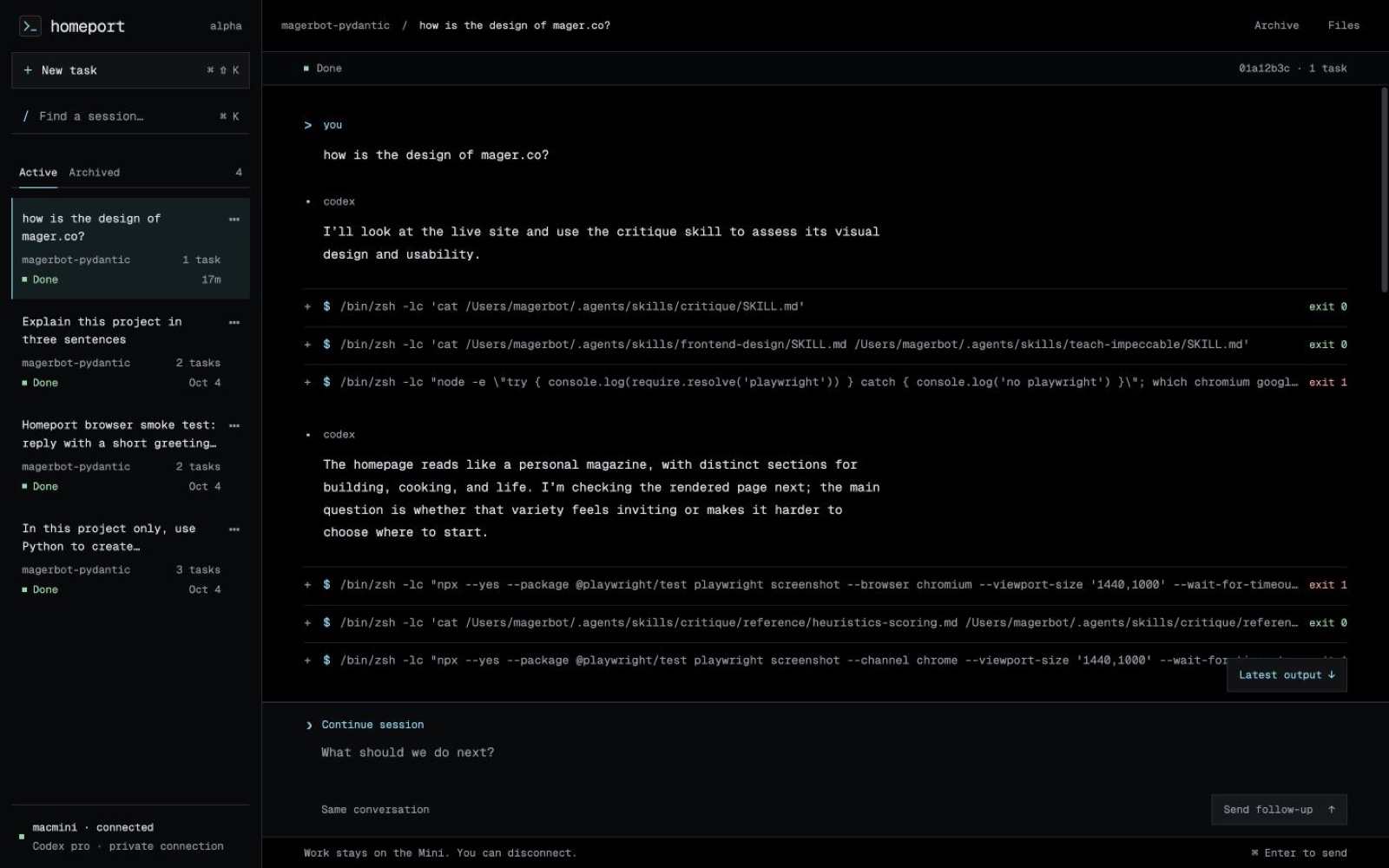
The screenshot above shows the workspace I use: saved sessions on the left, Codex’s conversation and commands in the middle, and a prompt that stays within reach. The public site has a walkthrough and setup guide. That site runs on Vercel; this coding workspace stays private on the Mini.
Codex does the coding; Pydantic keeps the records
I use Pydantic at work, so it was a natural choice for Homeport. But knowing what it does makes the rest of this architecture easier to understand.
Pydantic is a Python library for defining the shape of data and checking it when the program runs. Python type hints can tell an editor that a value should be a number; by themselves, they do not check incoming JSON. Pydantic turns a model definition into runtime parsing and validation, with errors that identify the field and rule that failed.
In this context, a “model” is a data model: a definition of a task, event, or result. It is not a language model.
A task becomes a checked record
Here is a shortened version of Homeport's task model. The full version also includes the working directory, timestamps, result, and a few recovery fields.
from typing import Literal
from uuid import UUID, uuid4

from pydantic import BaseModel, ConfigDict, Field


class Task(BaseModel):
    model_config = ConfigDict(
        extra="forbid",
        validate_assignment=True,
    )

    id: UUID = Field(default_factory=uuid4)
    prompt: str = Field(min_length=1, max_length=200_000)
    thread_id: UUID | None = None
    turn_id: str | None = None
    state: Literal[
        "queued", "preparing", "dispatching", "running",
        "completed", "failed", "interrupted", "uncertain",
    ] = "queued"
    timeout_seconds: float = Field(default=3600, gt=0)
That small definition does several useful things. An empty prompt fails validation. A timeout must be positive. A thread ID must parse as a UUID. The state must be one of the values the application understands. Unknown fields are rejected, so a misspelled timeout_second cannot quietly leave the default in place. With validate_assignment=True, assigning an invalid state later also raises an error.
Pydantic can parse compatible representations, such as a UUID string from JSON, into Python objects. Validation does not always mean rejecting every type conversion; strictness is a choice. In Homeport, that conversion is useful at the boundary between HTTP, Python, and storage.
The same definition also handles the trip to JSON and back:
task = Task(prompt="Review this project for bugs")
saved_record = task.model_dump_json()
restored = Task.model_validate_json(saved_record)

assert restored.id == task.id
assert restored.state == "queued"
This example only creates and reloads a record; it does not submit work. Homeport's store uses those same methods when writing task records to SQLite and loading them again. I get a checked Python object back, including its IDs, instead of a dictionary whose structure every caller has to guess.
Where it fits in an agent system
An agent system passes data between a user interface, a worker, tools, model responses, and storage. Each handoff is a place where missing fields or inconsistent values can become confusing behavior. A task marked complete in one component and completed in another is a small mismatch with a visible consequence: the interface may never recognize that the work is done.
Pydantic gives those components an explicit contract. In Homeport, I use separate models for configuration, submitted tasks, event envelopes, and results. That does not mean every nested tool payload is fully modeled; some event data remains a dictionary. The useful boundary is the part of the record our own code relies on.
The broader agent ecosystem uses the same idea for tool arguments and structured model outputs. Pydantic can also generate JSON Schema, a machine-readable description of expected fields and constraints, for integrations that accept it. Homeport currently uses Pydantic around Codex's protocol; it does not use our task model to constrain Codex's prose responses.
A valid record is still only a valid record. Pydantic cannot establish that an answer is true, a shell command is safe, or a task really completed. Listing the allowed states does not enforce the legal transitions between them. Those checks and decisions belong to the application.
The session manager is the combination
Homeport's Python worker manages dispatch and recovery. SQLite keeps durable records. Codex maintains the underlying conversation. Pydantic defines and validates the records that connect them. When I return to a session, Homeport uses the saved thread ID to continue the right conversation; Pydantic is not itself keeping an agent process alive.
That separation is why I like this setup. I can work on the browser and recovery behavior while keeping the task definitions explicit and shared across the Python code.
Pydantic AI is a separate agent framework with model, tool, and typed-output support. Homeport does not use it. Codex already provides the agent loop, so adding another orchestrator would need to solve a specific problem. Pydantic's validation library is useful here on its own.
The Mini uses my normal ChatGPT login. We checked the app-server's account response and confirmed that it reported my Pro plan. No separate API key was added. That still means Codex's plan limits apply, and model inference still happens through OpenAI. The Mini hosts the agent processes, project files, and local state.
One server, more than one way into the conversation
Before selecting an interface, we inspected the installed CLI help and the official app-server documentation. The installed release was Codex CLI 0.160.0. It exposes an app-server, a queue command, and structured output from codex exec.
Homeport runs one persistent app-server with a private Unix socket. The Python worker communicates with it using JSON-RPC. It starts or resumes a thread, starts a turn, receives structured events, and reads the final turn state.
The interactive CLI can connect to that same server:
codex resume --remote unix:///path/to/codex.sock THREAD_IDThat detail mattered enough to test directly. We connected the TUI, submitted a task through the Python harness, and watched the prompt and progress appear in the terminal. A later follow-up remembered context from the preceding turn.
Starting a second app-server is not a way to attach to an existing terminal session. Both clients need to target the same live server. We also found that this release rejects permission override flags on remote resume: the CLI inherits the server's permissions instead.
The harness does not scrape terminal output or type prompts through tmux send-keys. tmux keeps the processes alive and provides an optional terminal to attach to; structured messages carry the actual work.
The browser is where I start and return
I wanted the browser to feel like the terminal I already like working in. The October 11 refresh uses a continuous black transcript, regular monospace type, and a compact prompt dock. Commands show their actual exit status and expand to reveal the full output. Replies render readable Markdown, and code blocks have a copy action.
A few details make it easier to return to work:
- Find a session: search by prompt, project, status, or session ID with ⌘/Ctrl K.
- Clear the active list: right-click a session to archive it, then restore it later. History remains saved, and running work continues.
- Inspect before continuing: open the read-only file pane, then send the next instruction in the same conversation.
- Keep your place: scroll back through the transcript while the prompt stays available; “Latest output” returns to the newest response.
On a narrow screen, the session list moves into a drawer and the conversation takes the available width.
The path from a device to the work looks like this:
Laptop or phone browser
        │ private HTTPS over Tailscale
        ▼
Homeport → SQLite queue → Python worker
                              │ Unix socket
                              ▼
                       Codex app-server
                              ▲
                              │
                       Optional Codex TUI
The web service binds to loopback on the Mini. Tailscale Serve provides a private HTTPS address, and Homeport checks the identity header supplied by Serve against the Mini owner's account. It also validates the request host and the origin of submissions. There is no public control endpoint or Codex token stored in the browser.
A real browser submission completed successfully. I sent a follow-up using the phone-sized layout, then reloaded the page and found both messages in the same conversation. The physical phone still needs its Tailscale sign-in refreshed, so I am distinguishing that responsive-browser test from a completed test on the phone itself.
A lost response is not permission to try again
The part I cared about most was what happens when the network fails after a task has been submitted.
Suppose Codex has already run a command, but the worker never receives the acknowledgement. Automatically submitting the prompt again might repeat a file edit or some external action. A retry that looks harmless at the HTTP layer can be a second instruction to an agent.
Homeport saves submission intent before requesting the turn. Once it has a turn ID, it can reconnect and observe that turn. If submission happened but acknowledgement is missing, the task becomes uncertain. It is not silently replayed, and later work on that thread waits for inspection.
The browser also generates and retains a request ID before sending. If its connection drops, checking that same submission uses the same ID. The database handles duplicate requests without adding a second task.
We tested recovery with a small command that waited 25 seconds and appended one line to a file. During the wait, the Python worker was terminated. Supervision restarted it, it recovered the acknowledged turn, and the file ended up with exactly one line.
We separately killed an actual SSH attachment and reconnected. The server, worker, and TUI kept their process IDs. Those are concrete tests of worker and connection recovery; they are not a claim that every failure mode is solved.
What keeps running, and what still needs work
A macOS LaunchAgent supervises the tmux panes for the server, worker, and web app. Closing a browser or losing the laptop's SSH connection leaves those processes on the Mini. After a reboot, the LaunchAgent starts when the macOS user logs in. Unattended boot and FileVault unlock are not configured or tested.
I deliberately configured Codex with full filesystem access and no command-approval prompts for this account. That is a consequential choice about what the agent can do on the Mini, separate from who can reach the interface. It still runs as an ordinary macOS user; it does not automatically get root or bypass privacy controls.
This is an early personal tool. The file pane previews code; it is not a full browser IDE. Tasks run through one worker. There are no push notifications or multi-user collaboration features. The app-server interface is experimental, so upgrading Codex deserves another round of testing.
The code is available in mager/homeport, including installation instructions, screenshots, and the verification notes. The current checks include 19 passing Python tests around validation, persistence, uncertain outcomes, private web access, and file boundaries, plus four JavaScript tests for Markdown rendering, safe links, literal code, and copying.
The useful change for me is that a coding conversation now has a home separate from the device I happen to be holding. I can open it, start something, leave, and return to the work.